
Anúncios
Managing an overflowing inbox can feel overwhelming, but the right app can transform chaos into clarity in just a few taps.
Email has become both a blessing and a curse in our digital lives. While it connects us instantly to work, friends, and services, it also accumulates clutter faster than we can manage. Promotional emails, newsletters, outdated notifications, and spam pile up relentlessly, making it difficult to find what truly matters.
Anúncios
Fortunately, specialized apps designed to clean and organize email inboxes have emerged as powerful solutions. These tools use intelligent algorithms to identify unnecessary messages, bulk-delete unwanted content, and help you maintain a streamlined communication hub. Let’s explore how these apps work and why they’re essential for anyone struggling with email overload.
📧 Why Your Inbox Needs a Deep Clean
The average person receives dozens of emails daily, many of which are irrelevant or redundant. Over time, this accumulation creates several problems that affect productivity and mental well-being.
Anúncios
First, a cluttered inbox makes it harder to locate important messages. When you’re searching for a critical work email or a confirmation code, scrolling through hundreds of unread promotions becomes frustratingly time-consuming. This digital clutter creates unnecessary stress and reduces efficiency.
Second, storage limitations can become a real issue. Many email providers offer limited free storage, and once you hit that ceiling, you can’t receive new messages until you delete old ones. Cleaning your inbox regularly prevents this scenario and keeps your account functioning smoothly.
Third, security concerns arise when old emails containing sensitive information remain accessible. Password reset links, financial statements, and personal data sitting in your inbox for years can become vulnerabilities if your account is compromised.


🚀 How Email Cleaning Apps Actually Work
Email cleaning applications employ sophisticated technology to sort through your messages and identify patterns. They don’t just randomly delete emails—they use smart categorization to help you make informed decisions about what stays and what goes.
Most apps begin by scanning your entire inbox and analyzing message metadata. They look at sender addresses, subject lines, timestamps, and engagement patterns to understand which emails you actually read and which ones you ignore consistently.
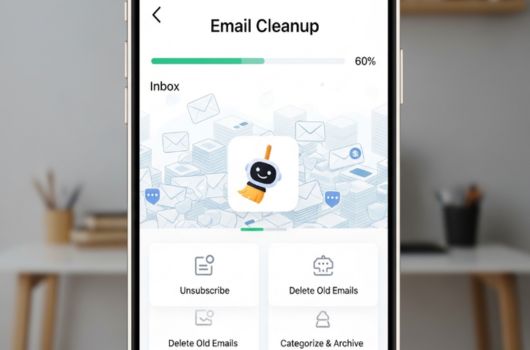
The apps then group similar messages together. For example, all emails from a particular retailer might be bundled into one category, allowing you to review and delete them in bulk rather than individually. This batch processing saves enormous amounts of time compared to manual deletion.
Advanced features include unsubscribe automation, where the app identifies subscription emails and offers one-click unsubscribe options. This prevents future clutter from the source rather than just treating symptoms.
✨ Key Features to Look For in an Email Cleaning App
Not all email cleaning apps are created equal. When choosing the right solution for your needs, several features distinguish exceptional tools from basic ones.
Intelligent Categorization
The best apps automatically sort emails into meaningful categories like newsletters, social media notifications, promotional content, and personal messages. This organization makes it easy to identify which categories consume the most space and need attention.
Bulk Actions
Manual email management is tedious. Look for apps that allow you to select entire categories or date ranges and perform actions on hundreds or thousands of messages simultaneously. Whether you’re deleting, archiving, or marking as read, bulk operations are essential.
Unsubscribe Management
A truly effective email cleaner helps you prevent future clutter by making it simple to unsubscribe from unwanted mailing lists. Some apps even aggregate all your subscriptions in one place, letting you manage them from a single dashboard.
Privacy and Security
Since these apps require access to your email account, security should be paramount. Look for applications that use encrypted connections, don’t store your credentials, and have transparent privacy policies. Reputable apps often undergo third-party security audits.
Multi-Account Support
Many people juggle multiple email accounts for work, personal use, and other purposes. Apps that support managing several accounts from one interface save time and create a unified cleaning experience.
💡 Step-by-Step Guide to Cleaning Your Inbox
Once you’ve downloaded an email cleaning app, following a systematic approach ensures you get the best results without accidentally deleting important messages.
Step 1: Connect Your Email Accounts
Begin by linking the email accounts you want to clean. Most apps support major providers like Gmail, Outlook, Yahoo, and iCloud. The initial scan may take several minutes depending on your inbox size.
Step 2: Review Auto-Generated Categories
Examine how the app has categorized your emails. You’ll typically see groups like “Old Emails,” “Large Emails,” “Subscriptions,” and “Social Updates.” This gives you an overview of where your clutter originates.
Step 3: Start with Low-Risk Categories
Begin cleaning with obviously unnecessary categories like old promotions, expired event notifications, or outdated newsletters. This builds confidence before tackling more nuanced categories.
Step 4: Unsubscribe from Unwanted Lists
Use the app’s unsubscribe feature to remove yourself from mailing lists you no longer find valuable. This proactive step reduces future inbox bloat significantly.
Step 5: Set Up Automation Rules
Many apps allow you to create rules that automatically handle incoming emails based on criteria you define. For example, you might auto-archive all social media notifications older than 30 days or auto-delete promotional emails after one week.
Step 6: Schedule Regular Maintenance
Email cleaning isn’t a one-time task. Schedule weekly or monthly sessions to review and clean new accumulations. Some apps offer automated cleaning schedules that run in the background.
🎯 Best Practices for Maintaining a Clean Inbox
Using an app is just part of the solution. Developing smart email habits ensures your inbox stays manageable long-term without constant intervention.
First, be selective about what you subscribe to. Before entering your email address on a website, consider whether you genuinely want regular communications from that source. Prevention is always easier than cure.
Second, use filters and labels proactively. Most email providers offer built-in filtering capabilities that automatically sort incoming messages. Combine these with your cleaning app for a powerful two-pronged approach.
Third, practice the “two-minute rule” for email processing. If you open an email that can be dealt with in two minutes or less—whether that’s replying, deleting, or filing—handle it immediately rather than letting it linger.
Fourth, unsubscribe ruthlessly. When you notice you consistently ignore emails from a particular sender, take the extra second to unsubscribe rather than just deleting that individual message.
🔒 Privacy Considerations When Using Email Cleaners
Granting any app access to your email requires trust, as these messages often contain sensitive personal and professional information. Understanding privacy implications helps you make informed decisions.
Reputable email cleaning apps use read-only access, meaning they can view and categorize your emails but cannot send messages on your behalf. Always verify the permissions an app requests before granting access.
Look for apps that process data locally on your device or use encrypted cloud processing rather than storing your emails on their servers. Many quality apps explicitly state they never sell user data or share it with third parties.
Check whether the app is compliant with data protection regulations like GDPR (General Data Protection Regulation) or CCPA (California Consumer Privacy Act). Compliance with these standards indicates a commitment to user privacy.
Finally, consider using app-specific passwords or OAuth authentication rather than sharing your main email password. This creates an additional security layer and allows you to revoke access easily if needed.
📊 Comparing Popular Email Cleaning Solutions
While many email cleaning apps exist, understanding how different solutions compare helps you choose the right fit for your specific needs and preferences.
Some apps focus primarily on bulk deletion and simple categorization, making them ideal for users who want straightforward cleanup without complexity. These typically offer free versions with basic features and premium upgrades for advanced capabilities.
Other applications emphasize automation and preventive features, with sophisticated rules engines that learn your preferences over time. These work best for power users managing high email volumes who want minimal ongoing manual intervention.
Design and user experience also vary significantly. Some apps offer minimalist interfaces focused purely on function, while others provide visually rich dashboards with statistics, charts, and gamified elements that make cleaning feel less like a chore.
Pricing models differ too. Many apps offer free tiers with limitations on the number of emails processed or accounts managed, while premium subscriptions unlock unlimited cleaning, advanced features, and priority support. Evaluate your volume and needs to determine which tier makes sense financially.
🌟 The Psychological Benefits of a Clean Inbox
Beyond practical advantages, maintaining an organized inbox delivers significant mental health benefits that shouldn’t be overlooked. Digital clutter affects us more than we often realize.
A cluttered inbox creates a subtle but persistent sense of overwhelm. Each time you open your email and see thousands of unread messages, your brain registers incomplete tasks, triggering mild stress responses. Cleaning this space provides genuine psychological relief.
There’s also the satisfaction factor. Watching thousands of unnecessary emails disappear in seconds delivers an immediate sense of accomplishment. This positive reinforcement can motivate better email habits going forward.
Focus and productivity improve when your digital workspace is organized. Just as a tidy physical desk helps concentration, a clean inbox allows you to quickly find what matters and reduces the cognitive load of processing information.
Finally, taking control of your inbox demonstrates self-care in the digital age. It’s a small but meaningful way to assert boundaries around your attention and time, refusing to let marketing algorithms dictate your mental space.
🔧 Troubleshooting Common Email Cleaning Challenges
Even with the best apps, you may encounter obstacles during the cleaning process. Knowing how to address common issues ensures smooth sailing.
Problem: The app deleted something important.
Most email services have trash or recycle folders where deleted messages stay for 30 days before permanent deletion. Check these folders immediately and restore any accidentally removed emails. Going forward, review batches more carefully before confirming deletion.
Problem: The app can’t connect to my email account.
This often stems from security settings in your email provider. Check if you need to enable third-party app access or generate an app-specific password. Gmail users, for example, may need to enable “Less secure app access” or use OAuth authentication.
Problem: Cleaning is taking too long.
For extremely large inboxes, initial cleaning might require patience. Start with the largest or oldest emails first to free up space quickly, then work through other categories. Some apps offer background processing that continues even when you close the app.
Problem: I’m overwhelmed by decisions.
If decision fatigue sets in, focus on obvious categories first—clear spam, old promotions, and expired notifications without overthinking. You can always return for more nuanced categories later when you have fresh energy.
🚦 When to Use Email Cleaning Apps vs. Manual Methods
Email cleaning apps aren’t always necessary for everyone. Understanding when they provide value versus when manual methods suffice helps you make the right choice.
Apps excel when you’re dealing with inbox volumes of several thousand messages or more. At this scale, manual cleaning becomes impossibly time-consuming, and the pattern recognition capabilities of apps save countless hours.
They’re also ideal if you subscribe to many newsletters and services. The unsubscribe aggregation and automated handling of recurring message types provide value that’s difficult to replicate manually.
However, if you maintain a naturally minimal inbox through disciplined daily habits, receiving only 20-30 emails per day that you process immediately, specialized apps may be unnecessary overhead. The built-in features of your email provider might suffice.
Similarly, if privacy concerns outweigh the convenience benefits for you, manual cleaning—though slower—gives you complete control without third-party access to your messages.
✅ Making Email Cleaning Part of Your Digital Wellness Routine
The most successful email management doesn’t happen through occasional massive cleanups but through consistent, sustainable practices integrated into your regular routine.
Consider scheduling a specific time each week for email maintenance—perhaps Friday afternoons when you’re wrapping up the work week. This regular appointment prevents overwhelming accumulation and keeps the task manageable.
Pair email cleaning with other digital wellness practices like clearing your downloads folder, organizing desktop files, or reviewing app subscriptions. Creating a holistic digital maintenance routine amplifies the benefits across all areas.
Celebrate milestones along the way. When you reach “inbox zero” or delete your 10,000th email, acknowledge the achievement. Positive reinforcement strengthens habits and makes maintenance feel worthwhile rather than burdensome.
Remember that perfection isn’t the goal—progress is. Some weeks you’ll keep your inbox pristine; others, life gets busy and emails accumulate. The difference is that with good tools and habits in place, you can quickly recover rather than drowning in perpetual clutter.
🎉 Reclaiming Control Over Your Digital Life
Your email inbox shouldn’t be a source of stress or a black hole where important messages disappear among promotional noise. With the right app and approach, you can transform this essential communication tool into a streamlined, efficient part of your life.
Email cleaning apps represent more than just convenient tools—they’re enablers of better digital habits and healthier relationships with technology. By automating tedious tasks and providing intelligent organization, they free up mental energy for what truly matters.
The time you invest in setting up and using these apps pays dividends through reduced stress, improved productivity, and the simple pleasure of opening your email without feeling overwhelmed. In our increasingly digital world, this kind of control over our virtual spaces translates directly to quality of life improvements.
Whether you’re drowning in 50,000 unread messages or simply want to prevent future clutter, taking action today sets you on a path toward lasting email sanity. Download an email cleaning app, commit to the process, and experience the liberating feeling of a truly clean inbox. Your future self will thank you for reclaiming this crucial digital space. 📬
