
Anúncios
Walkie-talkie apps have revolutionized how we communicate instantly, bringing the classic push-to-talk experience directly to our smartphones with enhanced features and global reach.
Remember those childhood days when walkie-talkies made you feel like a secret agent? That nostalgic thrill has evolved into sophisticated smartphone applications that combine simplicity with powerful modern features. Today’s walkie-talkie apps aren’t just digital versions of those bulky radios—they’re comprehensive communication tools used by everyone from construction teams to families on road trips.
Anúncios
These apps have become essential for businesses, emergency responders, event coordinators, and anyone needing instant voice communication without dialing numbers or waiting for calls to connect. Let’s explore everything you need to know about walkie-talkie applications and why they’re experiencing a remarkable resurgence in our smartphone-dominated world. 📱
What Makes Walkie-Talkie Apps Different from Regular Calling? 🎯
The fundamental difference lies in the immediacy of communication. Unlike traditional phone calls that require dialing, ringing, and waiting for someone to answer, walkie-talkie apps use push-to-talk (PTT) technology that delivers your voice instantly to recipients—often with less than a second of delay.
Anúncios


This half-duplex communication system means one person speaks while others listen, similar to radio communication. When you release the button, the channel opens for responses. This creates a more efficient workflow for team coordination compared to back-and-forth phone conversations.
Another distinguishing feature is the ability to broadcast to multiple people simultaneously. Instead of organizing conference calls or group chats, you simply press a button and everyone in your channel hears your message in real-time. This makes walkie-talkie apps incredibly valuable for situations requiring quick coordination across teams.
Top Features That Define Quality Walkie-Talkie Applications ✨
Not all walkie-talkie apps are created equal. The best ones incorporate features that enhance usability, reliability, and functionality beyond basic voice transmission:
- Crystal-clear audio quality: Advanced noise cancellation and compression algorithms ensure messages come through clearly even in noisy environments
- Reliable connectivity: Seamless switching between WiFi, 4G, and 5G networks without dropping connections
- Channel management: Create public or private channels for different groups, teams, or purposes
- Replay functionality: Listen to missed messages when you weren’t available to respond immediately
- Location sharing: See where team members are located on maps for better coordination
- Emergency alerts: Send priority messages that override other communications during critical situations
- Cross-platform compatibility: Connect with users regardless of whether they’re on iOS, Android, or desktop
- Low battery consumption: Optimized to run efficiently without draining your smartphone battery quickly
Industries and Professions Revolutionized by Walkie-Talkie Apps 🏗️
The versatility of walkie-talkie applications has made them indispensable across numerous sectors. Construction sites have replaced expensive two-way radios with smartphone apps that offer better range and additional features like photo sharing of work progress.
Event management teams rely heavily on these apps to coordinate everything from music festivals to corporate conferences. The ability to create separate channels for security, catering, technical crew, and management allows seamless multi-team coordination without interference.
Retail stores use walkie-talkie apps for floor staff to communicate with stockrooms, management, and security without disturbing customers with loud radio chatter. The discreet nature of smartphone communication maintains a professional atmosphere while keeping everyone connected.
Schools and universities have adopted these apps for campus security teams, maintenance crews, and administrative staff. During emergencies, the instant communication capability proves invaluable for implementing lockdown procedures or coordinating responses.
Hospitality businesses—hotels, resorts, and restaurants—depend on walkie-talkie apps to maintain service quality. Housekeeping, front desk, maintenance, and management stay in constant contact to address guest needs promptly and efficiently.
How to Choose the Perfect Walkie-Talkie App for Your Needs 🔍
Selecting the right app depends on understanding your specific requirements. Start by identifying whether you need the app for personal use, small team coordination, or large-scale organizational communication.
Consider the typical environment where you’ll use the app. If you work in areas with unreliable cellular coverage, look for apps with offline capabilities or low-bandwidth modes that maintain functionality even with poor connections.
Evaluate the user interface carefully. The best walkie-talkie apps feature large, easily accessible push-to-talk buttons that you can activate even while wearing gloves or without looking at your screen—crucial for drivers, construction workers, and outdoor professionals.
Security features matter significantly, especially for business applications. Look for apps offering end-to-end encryption, secure channels, and administrative controls that prevent unauthorized access to your communication networks.
Free vs. Premium Walkie-Talkie Applications 💰
Many excellent walkie-talkie apps offer free versions with basic functionality suitable for casual personal use or small groups. These typically include standard push-to-talk features, basic channel creation, and limited replay history.
Premium subscriptions unlock advanced features like extended message history, unlimited channels, priority support, administrative controls, integration with other business tools, and removal of advertisements. For businesses, the investment typically pays for itself through improved operational efficiency.
Some apps use a freemium model where individual users access basic features for free, but organizations pay for enterprise packages that include team management dashboards, analytics, compliance tools, and dedicated support.
Setting Up Your Walkie-Talkie App: A Step-by-Step Guide 📲
Getting started with a walkie-talkie app is remarkably straightforward. After downloading from your app store, create an account using your phone number or email address. Most apps verify your identity through a code sent via SMS or email.
Once registered, explore the interface and locate the main push-to-talk button—usually prominently displayed in the center of the screen. Test it by recording a message to yourself or joining a public test channel if available.
Create or join channels based on your needs. Private channels require invitations and are ideal for teams, while public channels allow anyone to join and are perfect for hobby groups or community coordination.
Customize your settings to optimize performance. Adjust audio quality based on your typical network conditions—higher quality for WiFi environments, compressed audio for cellular connections to reduce data usage.
Configure notification preferences carefully. You might want immediate alerts for certain channels while setting others to notify only when mentioned by name, preventing notification overload while staying connected to multiple groups.
Advanced Tips for Maximizing Walkie-Talkie App Efficiency 🚀
Develop clear communication protocols within your team. Establish conventions like identifying yourself before speaking, using concise messages, and confirming receipt of important information. This prevents confusion and improves coordination efficiency.
Utilize channel organization strategically. Create dedicated channels for different purposes—one for urgent matters, another for general updates, and separate channels for different departments or project teams. This prevents important messages from getting lost in high-volume chatter.
Take advantage of status features that let contacts know when you’re available, busy, or offline. This reduces unnecessary attempts to reach you during meetings or off-hours while maintaining accessibility for emergencies.
Integrate walkie-talkie apps with Bluetooth devices like earpieces or vehicle-mounted PTT buttons for hands-free operation. This proves especially valuable for drivers, warehouse workers using forklifts, or anyone needing both hands free while communicating.
Troubleshooting Common Walkie-Talkie App Issues 🔧
Audio quality problems typically stem from poor network connections or microphone issues. Test your connection strength and try switching between WiFi and cellular data. Ensure your microphone isn’t blocked by a case and that app permissions include microphone access.
If messages aren’t transmitting, check that you’re properly connected to your channel and that your account is active. Some apps limit message length—if your transmission cuts off, try speaking in shorter segments.
Battery drain concerns can be addressed by adjusting settings. Disable unnecessary features like constant location sharing, reduce audio quality slightly, and ensure the app isn’t set to prevent your phone from entering sleep mode when not actively in use.
Delayed message delivery usually indicates network congestion or server issues. Premium accounts often receive priority during high-traffic periods, so consider upgrading if you consistently experience delays during critical operations.
Privacy and Security Considerations for Walkie-Talkie Communications 🔒
Understanding the privacy implications of walkie-talkie apps is crucial, especially when discussing sensitive information. Unlike traditional radio communication that anyone with the right equipment can intercept, quality apps encrypt transmissions to protect your conversations.
Read privacy policies carefully to understand how apps handle your data. Some store recordings temporarily for replay functionality, while others delete messages immediately after delivery. Know whether your communications are truly private or potentially accessible to service providers.
For business use, implement organizational policies governing what information can be shared through walkie-talkie apps. Establish separate secure channels for confidential discussions and train employees on appropriate usage to prevent inadvertent data leaks.
Be cautious when joining public channels. Anyone can listen to conversations in open channels, so avoid sharing personal information, locations, or sensitive details in these spaces. Reserve such communications for private, encrypted channels with verified members.
The Future of Walkie-Talkie Technology in Our Connected World 🌐
Walkie-talkie apps continue evolving with technological advances. Artificial intelligence integration is beginning to offer features like automatic message transcription, translation between languages in real-time, and smart notifications that learn which messages you consider priority.
5G networks promise to eliminate the already minimal delay in push-to-talk communications, making the experience virtually instantaneous even when connecting users across continents. This enhanced connectivity will expand use cases into areas requiring split-second coordination.
Augmented reality features are emerging that overlay communication interfaces onto smart glasses and other wearable devices, allowing truly hands-free operation while displaying caller information and channel details in your field of vision.
Integration with Internet of Things (IoT) devices will enable walkie-talkie apps to trigger automated responses—imagine coordinating not just with team members but also with smart building systems, vehicles, and equipment through the same interface.
Making the Most of Walkie-Talkie Apps in Personal Life 👨👩👧👦
Beyond professional applications, walkie-talkie apps offer surprising value for personal communication. Families on road trips can stay connected across multiple vehicles without expensive cellular calls, making travel coordination effortless and fun for kids who enjoy the interactive nature.
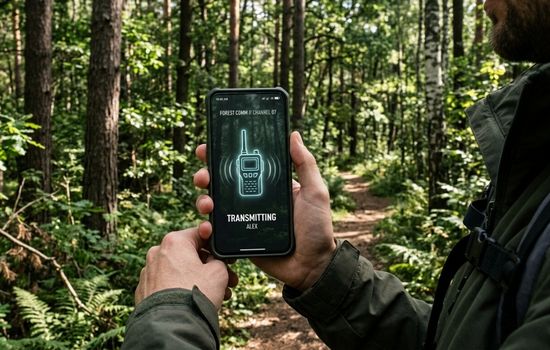
Outdoor enthusiasts—hikers, skiers, and campers—benefit tremendously when exploring areas with limited cellular coverage. The low-bandwidth requirements of walkie-talkie apps often maintain functionality where regular calls fail, providing an essential safety tool.
Parents use these apps to stay in touch with children who have smartphones but aren’t ready for unrestricted calling and texting. The controlled environment of specific channels offers communication freedom within safe boundaries.
Neighborhood watch groups and community organizations coordinate effectively through dedicated channels that keep residents informed about local issues, events, and safety concerns without relying on slower email chains or social media groups.
Comparing Walkie-Talkie Apps with Traditional Two-Way Radios 📻
Traditional two-way radios still have advantages in specific scenarios. They don’t require cellular or WiFi connectivity, making them reliable in remote wilderness areas or during disasters when communication infrastructure fails. Battery life often exceeds smartphones significantly.
However, walkie-talkie apps eliminate the need for expensive dedicated hardware—most people already carry capable smartphones. There’s no radio licensing required, no frequency coordination with other users, and no range limitations beyond internet connectivity.
The cost difference is substantial. Quality two-way radio systems for business can cost hundreds or thousands of dollars per unit, while walkie-talkie apps are free or require modest subscriptions. This democratizes instant group communication for small businesses and casual users.
Maintenance and management favor apps as well. Lost or broken smartphones can be replaced and rejoined to channels within minutes, whereas damaged radios represent significant equipment replacement costs and potential communication gaps during repair or replacement periods.
Maximizing Battery Life While Using Walkie-Talkie Apps 🔋
Battery consumption concerns many users, but smart practices can extend your device’s runtime significantly. Reduce screen brightness and enable automatic timeout so the display turns off quickly when not actively needed—the audio functions continue working with the screen off.
Close unnecessary background applications that compete for processing power and network resources. Walkie-talkie apps are relatively lightweight, but other apps running simultaneously can compound battery drain unnecessarily.
Use WiFi connections when available rather than cellular data. WiFi typically consumes less power while often providing more stable connections for higher audio quality and faster message transmission.
Invest in external battery packs or charging cases if you rely heavily on walkie-talkie functionality throughout long workdays. Modern portable chargers are compact and can fully recharge smartphones multiple times, eliminating battery anxiety during critical operations.
Building Effective Communication Culture with Walkie-Talkie Apps 🗣️
Technology alone doesn’t guarantee effective communication—organizational culture matters tremendously. Establish clear guidelines about appropriate usage, including which matters warrant interrupting colleagues via push-to-talk versus sending text messages or emails.
Train team members on radio etiquette basics: speak clearly at a moderate pace, identify yourself when joining conversations, use plain language rather than unclear codes, and keep transmissions concise to avoid monopolizing channels during busy periods.
Designate channel purposes explicitly. Having separate channels for emergencies, general operations, and casual conversation prevents critical messages from being overlooked amid routine chatter and social interactions.
Encourage feedback about communication effectiveness. Regular check-ins about whether the system is working well, whether too many or too few channels exist, and what frustrations people experience can guide improvements that enhance adoption and satisfaction.
Why Walkie-Talkie Apps Continue Growing in Popularity 📈
The resurgence of walkie-talkie applications reflects broader communication trends favoring immediacy and efficiency. In our attention-fragmented world, the simplicity of push-to-talk cuts through digital clutter—no typing, no waiting, just instant voice connection.
Remote and hybrid work models have created demand for communication tools that bridge the gap between in-person coordination and digital collaboration platforms. Walkie-talkie apps provide the spontaneity of walking to a colleague’s desk without the formality of scheduling video calls.
Younger generations discovering walkie-talkie functionality find it refreshingly different from text-heavy communication they’ve grown weary of. The voice-first, synchronous nature feels more personal and engaging than endless message threads.
As smartphones become ubiquitous even in developing regions, walkie-talkie apps offer affordable communication solutions for businesses and communities that couldn’t justify investing in traditional radio systems. This global accessibility continues driving adoption across diverse populations and use cases.
The combination of nostalgia, practicality, and modern technological enhancement has positioned walkie-talkie apps as not just a temporary trend but a lasting evolution in how we coordinate, collaborate, and stay connected in increasingly complex and fast-paced environments. Whether you’re managing a construction site, coordinating a family outing, or staying connected with friends during adventures, these applications bring powerful communication capabilities right to your pocket. 🌟
